Showing posts with label Teeps. Show all posts

Monday, 26 December 2011

Download Youtube Videos with out using any software

open youtube and select any video ,in address bar in front of youtube add kick and press enter
it will open a download page ,click on download ,the selected video will be downloaded

ex: http://www.kickyoutube.com/watch?v=sasad7657dms2


Wednesday, 21 December 2011

HOW TO REMOVE /CHANGE WINDOWS ADMINISTRATOR PASSWORD

You forgot the windows Xp Administrative password or remove the password ,To insert windows xp cd to remove or change the windows xp administrative password as follow the bellow steps
1.Insert the windows xp cd on cd drive and restart the system
2.Press any key
3.os files are coppied to system ,After copying the bellow image is displayed just press enter
4.To see Windows license agreement ,press f8 in key board
5.Next Screen it displays windows xp repair press r ,some files are loaded ,after completion system will be restarted and install process will be started
6.The bellow screen left side activate installing  windows just press shift+f10 ,It will open a command prompt ,In Command prompt type the bellow code and press enter
Code : NUSRMGR.CPL
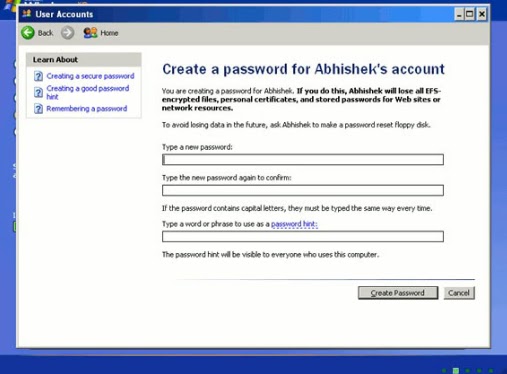
Then you will acess user accounts
7.Bellow Screen will be Displayed just enter password ,if you don't have password leave it

Sunday, 18 December 2011

Using Gmail Drive To Get Up To 7 Gb Additionl Space in Computer

To install This gmail drive , my computer lo same as hard disk it will be created up to 7gb virtual drive ,to copy any files or and data into that gmail virtual drive 

Set Your Photo And Your Details In My Computer Properties

sTo set u r photo and details in my computer properties to follow the bellow steps
1.Open Notepad And Copy the bellow Code and modify your Details
 code:
          [General]
Manufacturer= SivaKrishna
[Support Information]
Line1= http://www.pcspidertechnology.blogspot.com
2.Save the Notepad file in windows >>System32 folder lo oeminfo.ini save this name
3.set you image pixel as 180 px width *120 px height and save windows>>system32 older lo oemlogo.bmp save this name
4.right on my computer and see the properties 


Saturday, 17 December 2011

Draw a Figure And Share Your Friend


In Internet to chat u r friends ,but also u send  a figure in that chat to visit the Draw site ,in that site to select the different breshes and draw the different funny pictures and share those funny picture to your friends in online chat ,to go the site click on bellow link


http://draw.to/new